Activity Overview: Balance of Equality
Introduction
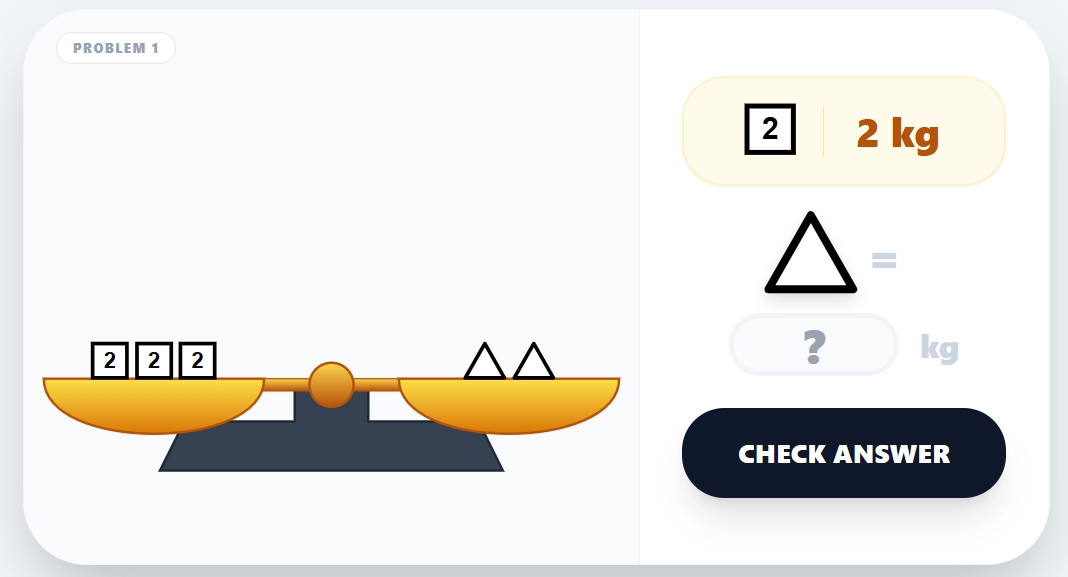
The Balance of Equality Activity is an interactive, web-based educational tool designed to help students understand the fundamental concepts of algebraic equations through a visual and hands-on approach. By using a virtual balance scale, students learn that an equation is like a scale that must remain balanced on both sides.
Learning Objectives
Understanding Equality: Grasp the concept that the “=” sign represents a state of balance between two sides.
Algebraic Thinking: Develop skills to find an unknown value (represented by fruits or geometric shapes) based on known weights.
Equation Properties: Learn that adding or subtracting the same amount from both sides of an equation maintains equality.
Unit Familiarity: Practice working with different mass units such as grams (g) and kilograms (kg).
Key Features
10 Progressive Problems: Challenges range from simple weight comparisons to complex scenarios involving multiple variables and different units.
Visual Feedback: High-quality SVG illustrations of fruits (pineapple, watermelon, cherry, etc.) and geometric shapes provide a concrete representation of abstract numbers.
Interactive Balance Scale: The scale physically tilts when it is not in equilibrium (in specific problems), helping students visualize weight differences.
Gamified Elements: – Sound Effects: Auditory cues for key presses, correct answers, and errors.
Pedagogical Hints: Provides strategic advice on how to simplify equations by “removing the same amount from both sides.”
How to Use the Activity
Analyze the Scale: Look at the objects on the left and right pans of the scale.
Read the Clues: Check the reference box next to the scale to see the mass of known objects (e.g., 1 Weight = 5 kg).
Calculate the Unknown: Determine the mass of the specific object asked in the question.
Enter Your Answer: Type the numerical value into the input box provided in the interactive panel.
Verify: Click the “CHECK ANSWER” button. If correct, you will hear a success melody and see confetti. If incorrect, you will hear a warning tone, allowing you to try again.
Reset: Use the “RESET AND RETRY” button at the footer to clear all answers and start over.



1 comment